
Not medical advice: DBH Fighting Dialysis Dashboard is for education and information only. This program does not provide medical advice, diagnosis, or treatment and is not a substitute for care from a qualified health professional. Consult your dialysis care team or another licensed clinician about medical questions and before changing medicines, dialysis, diet, fluids, or supplements. Do not delay seeking medical care because of information in this dashboard.
Important: This master dashboard organizes supplied results and suggests a care-discussion path. It cannot diagnose disease, prescribe treatment, or promise healing or kidney recovery. Decisions belong with the dialysis, nephrology, endocrinology, primary-care, and renal-nutrition teams. Urgent or severe symptoms require prompt medical evaluation.
Patient Profile & Dialysis Care Team
Editable patient informationComplete only the fields you want stored on this device. Use Save changes after editing so important patient and care-team information stays with the dashboard.
Dialysis Schedule — Select DaysChoose every regular dialysis day and appointment time, then select Save changes.
Health and identity information entered here is stored locally but is not encrypted. Avoid entering identifiers on a shared or untrusted device.
Patient Appointment & Reminder Center
Save appointments, select email or text preferences, and add calendar reminders.
Notification status: calendar files can activate device reminders after you add them to your calendar. Email and text buttons prepare a message in your device’s mail or messaging app. Fully automatic email/SMS delivery requires a connected, secured messaging service and sender account, which are not included in this local-only build.
Heart & Lungs — Dialysis Education
Visual guides to blood flow through the dialyzer and fluid buildup in the lungs. Select the pull-down button to show the charts and animation.
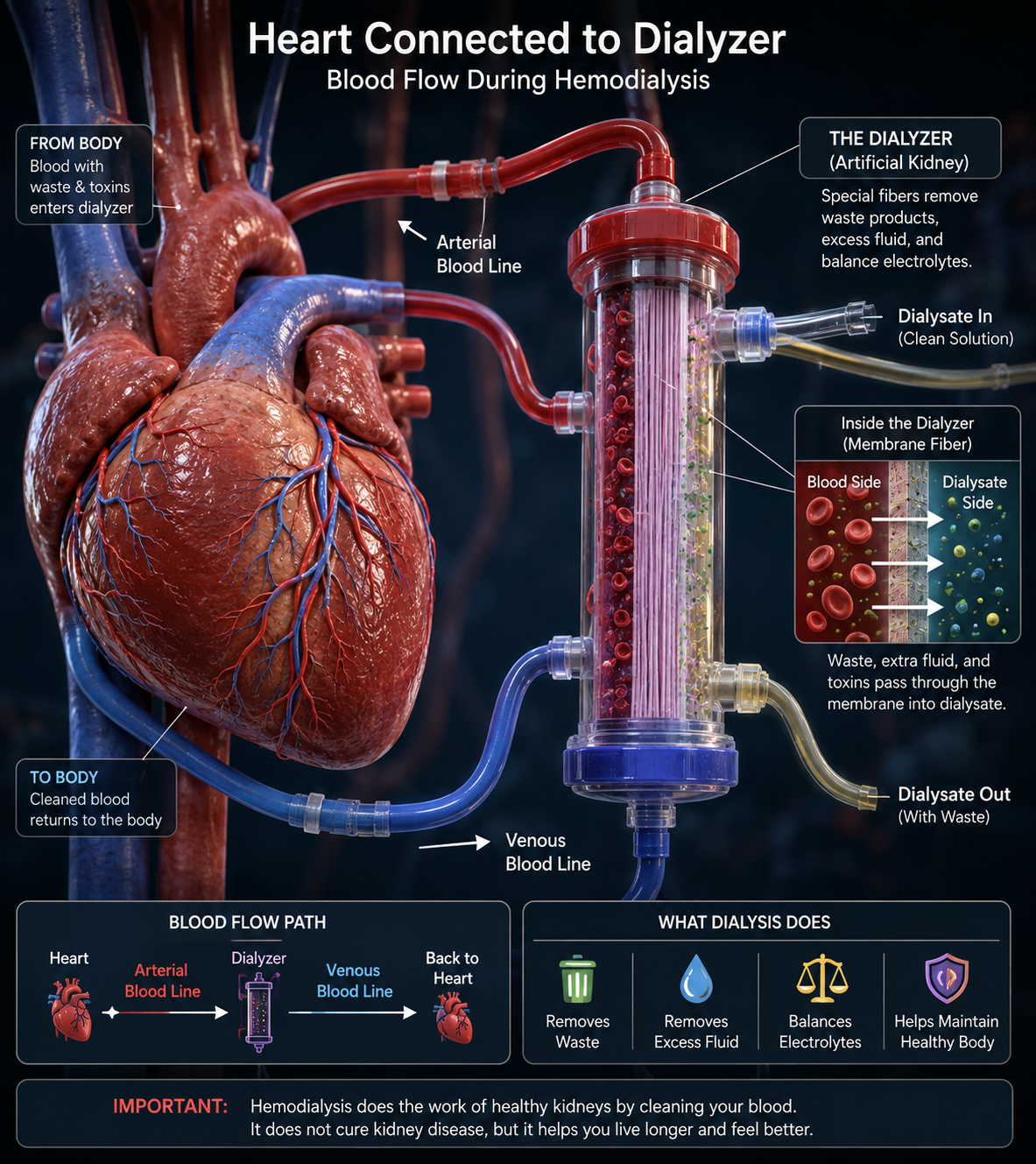
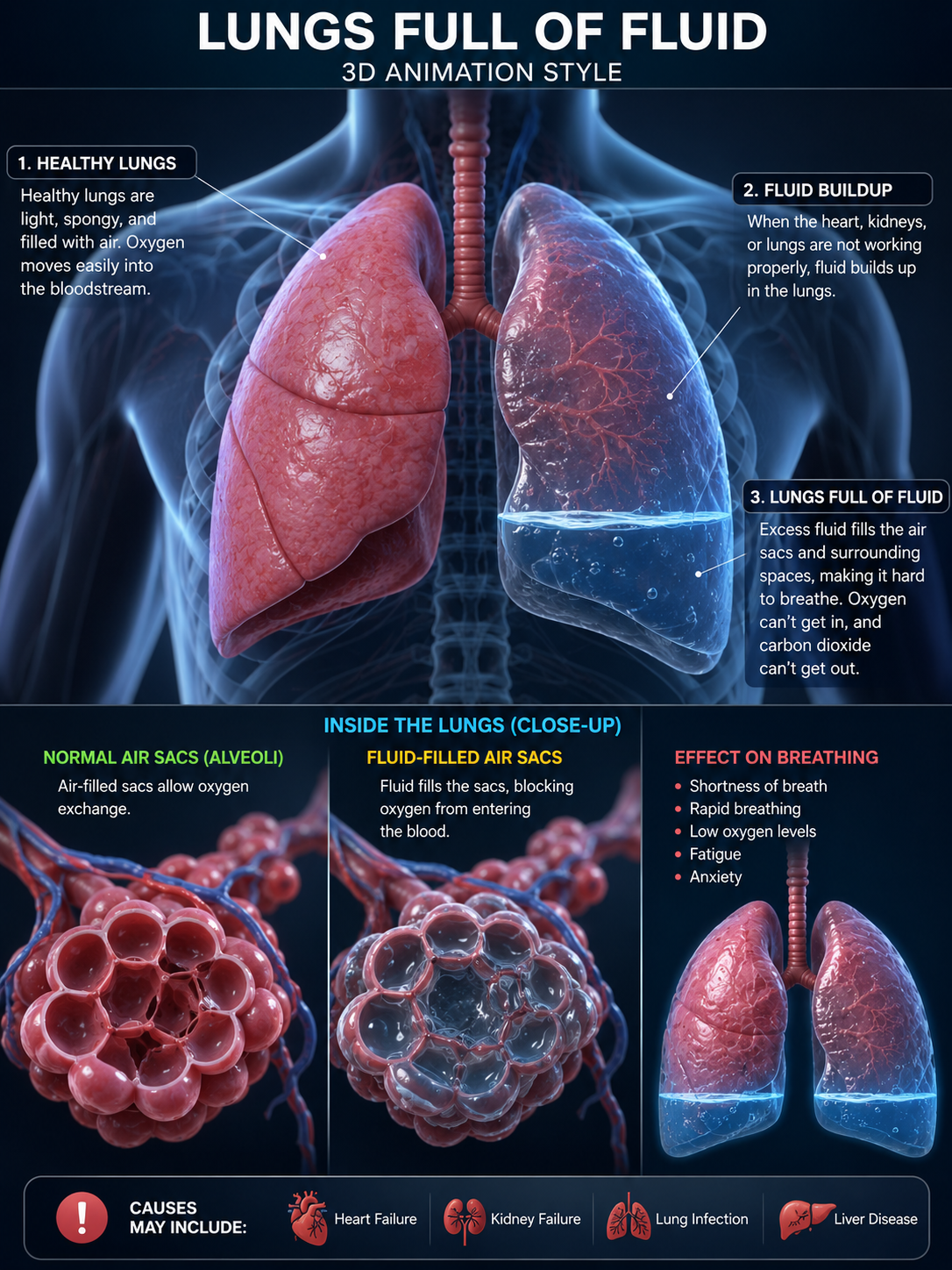
Animated Blood-Flow Path
Follow the moving cellsBodyblood out
Dialyzercleans blood
Bodyblood returns
Heartpumps blood
Lungsgas exchange
Heart + Bodyoxygen delivered
Red: oxygen-rich / arterial directionBlue: low-oxygen / venous direction
Two connected systems: The dialyzer removes waste and excess fluid from blood. The lungs exchange oxygen and carbon dioxide; dialysis does not oxygenate the blood.
Get urgent medical help: New or severe shortness of breath, chest pain, blue or gray lips, fainting, confusion, or rapidly worsening breathing may be an emergency. Contact the dialysis team promptly for sudden swelling, rapid weight gain, or breathing changes.
New Health Record
Add future labs, vitals, symptoms, weight, food notes or activity. Records stay on this device.
Install on iPhone: open from a secure web address in Safari, tap Share, then “Add to Home Screen.” Install on Android: open in Chrome and choose “Install app” or “Add to Home screen.” Offline installation requires the dashboard to be served from HTTPS rather than opened as a local file.